Build surveys in Claude. Let Quaflo verify them before they go live.
A research-grade survey platform: 33 question types, 26 logic conditions, quota reservation and 11 respondent languages. The web editor and your AI assistant edit the same survey.
Quaflo is an online survey platform with a built-in MCP server: 33 question types, display and skip logic, quotas and 11 respondent languages. Claude, Cursor and other AI assistants can create, validate, simulate and publish surveys directly.
Free during beta · No payment required · Export anytime
Works with these AI assistants and editors
- ClaudeOAuth connector
- ChatGPTOAuth connector
- CursorAccess token
- Claude CodeAccess token
- WindsurfAccess token
- CodexAccess token
- 33question types
- 26logic conditions
- 28MCP tools
- 11respondent languages
- 31validation rules
Who catches the logic errors in an AI-built survey?
Most survey MCPs stop at creating surveys and reading data. Quaflo adds three machine checks before publishing, each with a fix hint, and you confirm the release.
- 1
Learn
survey_learn_question_schema
Read the field schema and example for each question type first. No guessing.
- 2
Build
survey_create · survey_patch
Create the survey shell, then add groups, questions, options and logic in batches.
- 3
Validate
survey_validate
31 rules: empty titles, unreachable questions, broken jumps, missing references, duplicate numbers… each with a fix hint.
- 4
Simulate
survey_simulate
Run a set of answers through the branches; see which quotas fire and where the survey ends.
- 5
Review
survey_review_snapshot
A human-readable snapshot to check against the source questionnaire, with missing translations flagged.
Can I use it without AI?
Quaflo is a complete web survey platform first. The AI assistant is an accelerator, not a requirement.
AI assistant
Build, validate, simulate and publish in natural language from Claude and other clients.
- OAuth connector or access token, three steps to connect
- 28 MCP tools from creation to statistics
- Permissions are the scopes you grant
Web editor
Drag-and-drop editing, logic and quota settings, publishing, reports and shareable dashboards.
- 33 question types with visual logic and quota setup
- One question per page, resume later, password and duplicate protection
- Reports, cross-tabs and shareable dashboards
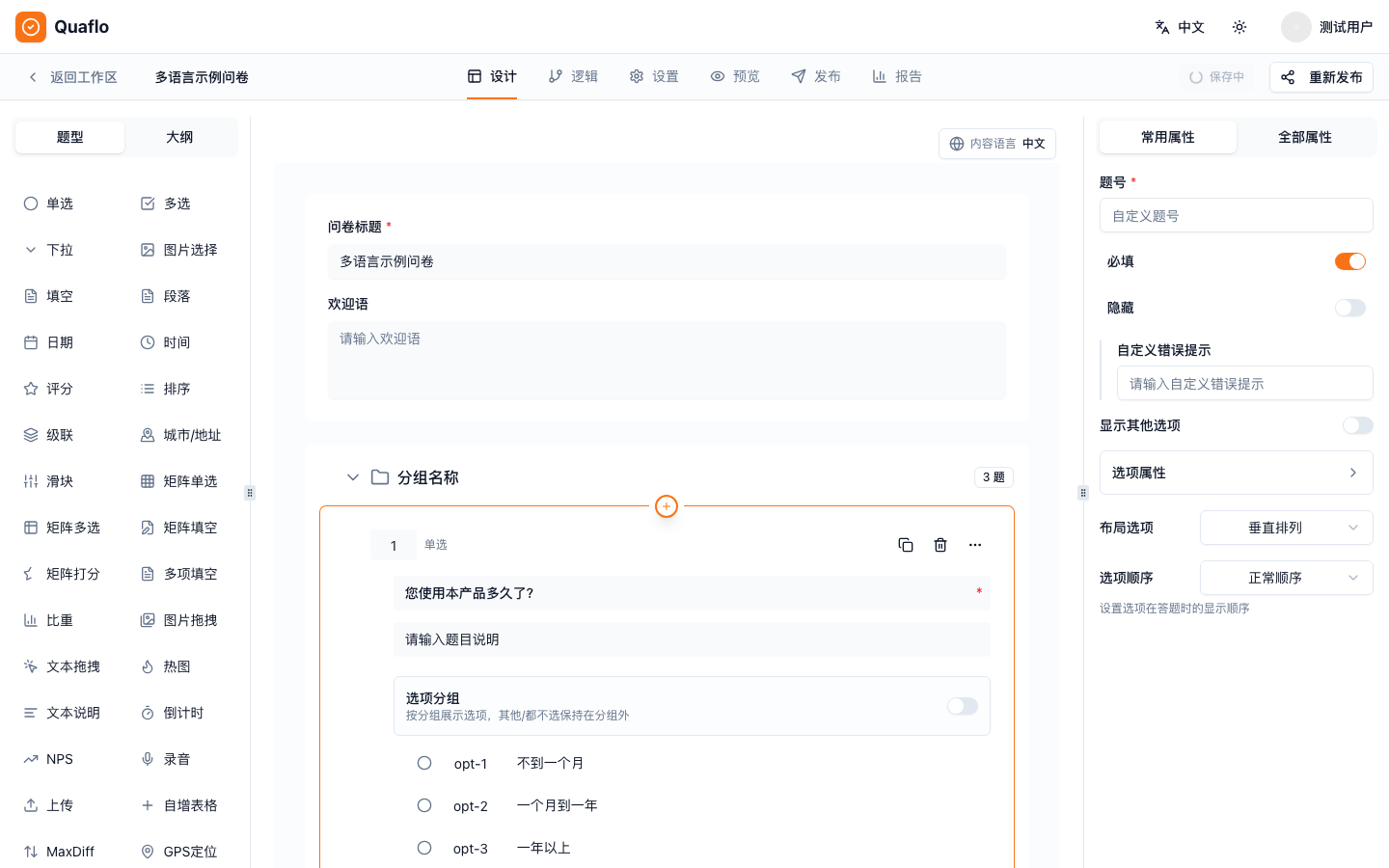
Both paths edit the same survey: writes carry a revision number and conflicts are rejected; the editor shows who else is editing. Nobody overwrites anybody.
Which question types and logic does Quaflo support?
An engine built for professional research, not a form builder.
33 question types
Including heatmap, MaxDiff, GPS location, signature, audio recording, image drag and proportion allocation.
26 logic conditions
Nested AND / OR, three terminations (screen-out, quota full, quality), variables and piping.
Quota reservation
Quota groups and rules, session-level reservation with automatic release; progress visible on shared dashboards.
11 respondent languages
One survey, many languages; respondents can switch, and missing translations are flagged at review.
One question per page
Server-driven sessions evaluate logic per answer; respondents can resume later.
Response protection
Password access, duplicate prevention and response limits.
How do I export and share the data?
From SPSS to shareable dashboards, your data is always yours.
SPSS
Codebook and .sps syntax file, ready to import.
XLSX / CSV
Raw responses and statistics; large exports run asynchronously.
Cross-tabs
Cross any two questions directly in the report.
Shared dashboards
Password and expiry controls, quota progress included.
Survey export
Export the questionnaire itself to Word or Excel for review and archiving.
MCP statistics
AI assistants read the summary via survey_report_summary.
Can the AI delete or overwrite my survey?
The AI's permissions have a boundary, and you draw it.
The AI can
- Read, create and edit surveys within the scopes you grant (8 scopes, granted individually)
- Publish or unpublish once you grant the publish scope
- Read masked responses and statistical summaries
- Submit test responses; validation and simulation never persist
The AI cannot
- Do anything outside the scopes you granted
- Overwrite what you just changed in the browser: writes carry a revision and conflicts are rejected
- See respondent IP or device details: masked on read
- Exceed 30 writes or 10 publishes per minute
Every call is audited: who, which token, which tool, and the outcome.
Who uses Quaflo?
From sample collection to academic research, one engine.
Market research and panels
Quota reservation and screen-outs keep the sample structure; quality termination filters bad responses.
Quotas · Screen-out · QualityAcademic research
Direct SPSS codebook and syntax export, multilingual answering, logic validated before release.
SPSS · Languages · ValidationProduct and UX research teams
Team roles and folders, dashboards for colleagues, AI assistants wired into the workflow.
Teams · Dashboards · MCPStill have questions?
Ready to start?
Free during beta: build a survey in the browser first, then connect your AI assistant.
- Free during beta
- Web editor and AI assistant, your choice
- Export anytime